

 by Austin LeClear
on November 19, 2026
TLDR: On August 17, 2026, Google changed how smart bidding works on budget-limited campaigns. Before, these campaigns could hit a CPA or ROAS well below the target you set. Now, they trend toward the actual target instead. Accounts that didn’t adjust are getting fewer conversions for the same spend. This article explains what changed, why it matters, and the two paths to fix it.
On August 17, 2026, Google quietly removed one of the best-kept secrets in Google Ads.
Before that date, if your campaign had a Target CPA or Target ROAS goal and was limited by budget, it would often overperform that goal. You’d ask for a $50 CPA and get $30.
Unfortunately, that is no longer how it works. If your account was benefiting from this behavior and no one adjusted after August 17, you are almost certainly spending more to get the same result, or hitting your target with less volume. Here’s what the change did and what to do about it.
Prefer video? Check out How I’m Navigating Monday’s Bid Algorithm Change on YouTube:
Still with us? Good, let’s dig in.
What Target CPA and Target ROAS Actually Tell Google
When you set a Target CPA or Target ROAS on a campaign, you’re giving Google a goal to hit. Target CPA says, I’m willing to pay up to this much for a conversion. Target ROAS says, I want this much revenue back for every dollar I spend.
Google’s smart bidding algorithm uses that target to decide which auctions to enter and how much to bid in each one.
A campaign is limited by budget when it consistently spends its full daily budget and Google is telling you, in the campaign status, that you could get more conversions if the budget were higher.
Before August 17, those two things combined in a way many advertisers didn’t fully understand.
What Changed on August 17th
Before the change, a budget-limited campaign with a Target CPA of $10 could easily produce a $5 CPA. The bidding algorithm, knowing the budget would cap daily spend regardless, went after the cheapest conversions it could get inside that cap.
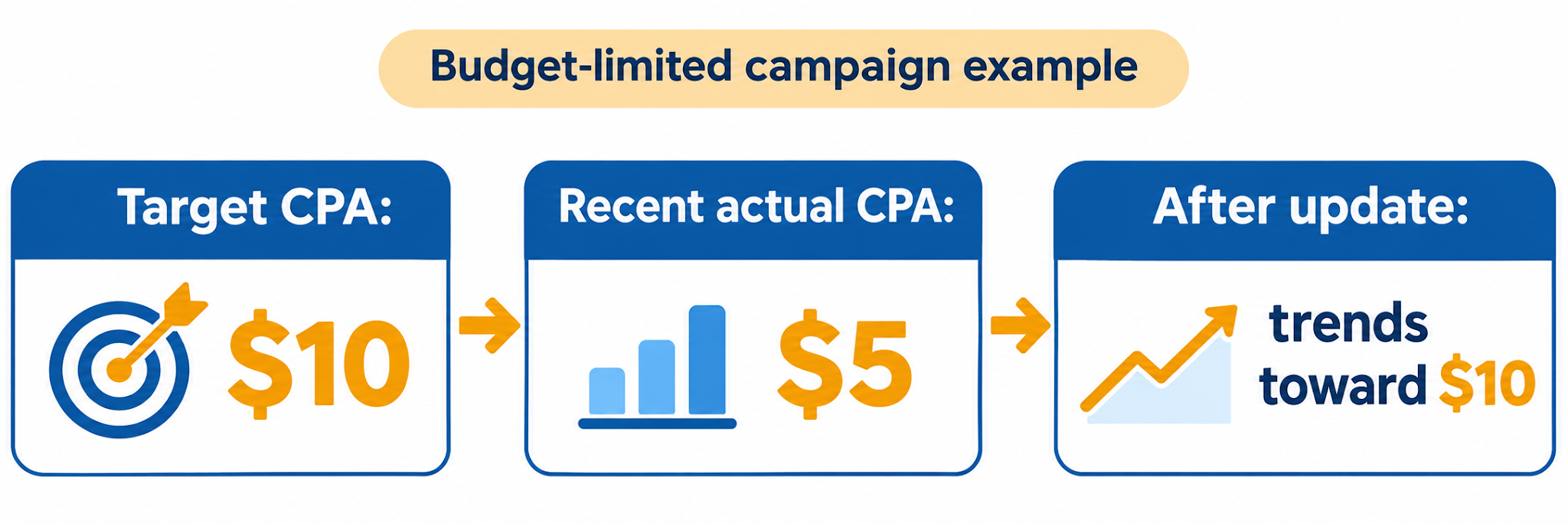
The Target CPA was, in practice, a ceiling, not a floor.
Starting August 17, that behavior is gone. If you set a $10 Target CPA on a budget-limited campaign, Google now bids for a $10 CPA. If you were getting $5 before, you will trend toward $10. Google is entering more expensive auctions on your behalf because that’s what your target says you’re willing to pay.
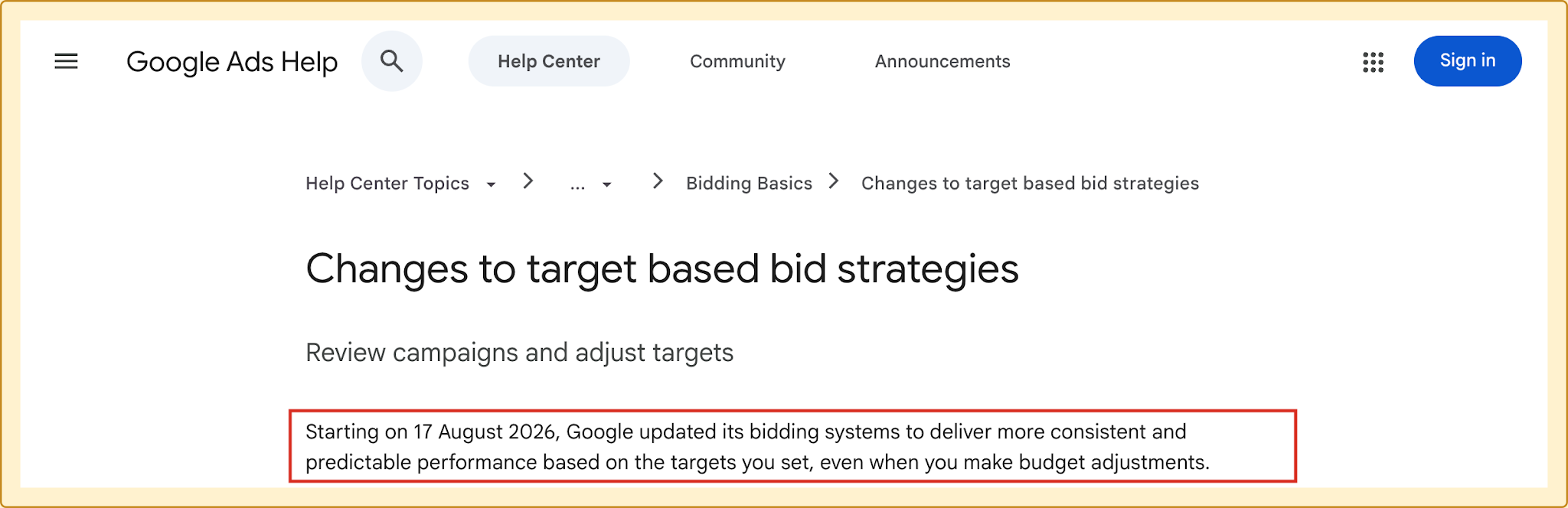
Google Ads Help announcement; the August 17 update is outlined.
The change applies to almost every campaign type that uses Target CPA, Target ROAS, Maximize Conversions with a target, or Maximize Conversion Value with a target. The only exceptions are app campaigns, video reach campaigns, and video view campaigns, which were explicitly carved out.
Read more: When to Switch from Maximize Conversions to Target CPA
Why Google Did This
Google’s public rationale is stability. Advertisers were seeing campaigns overperform their targets, then raise budgets, then watch performance fluctuate as the algorithm had to work across a wider range of auctions. That fluctuation freaked people out.
Making the Target CPA and Target ROAS behave as a direct target rather than a ceiling gives advertisers more predictable results when they scale. That part is fair.
The other part is harder to ignore. The change almost certainly makes Google more money, because it unlocks auctions the algorithm would have previously skipped as too expensive for the budget-limited campaign.
Stability for the advertiser. More revenue for Google. Both can be true.
A Real Account: 350% ROAS Trending Down to 200%
Here is an actual client campaign from our agency. It has achieved a 350% ROAS over the last 30 days.
The Target ROAS set on the campaign is 200%.
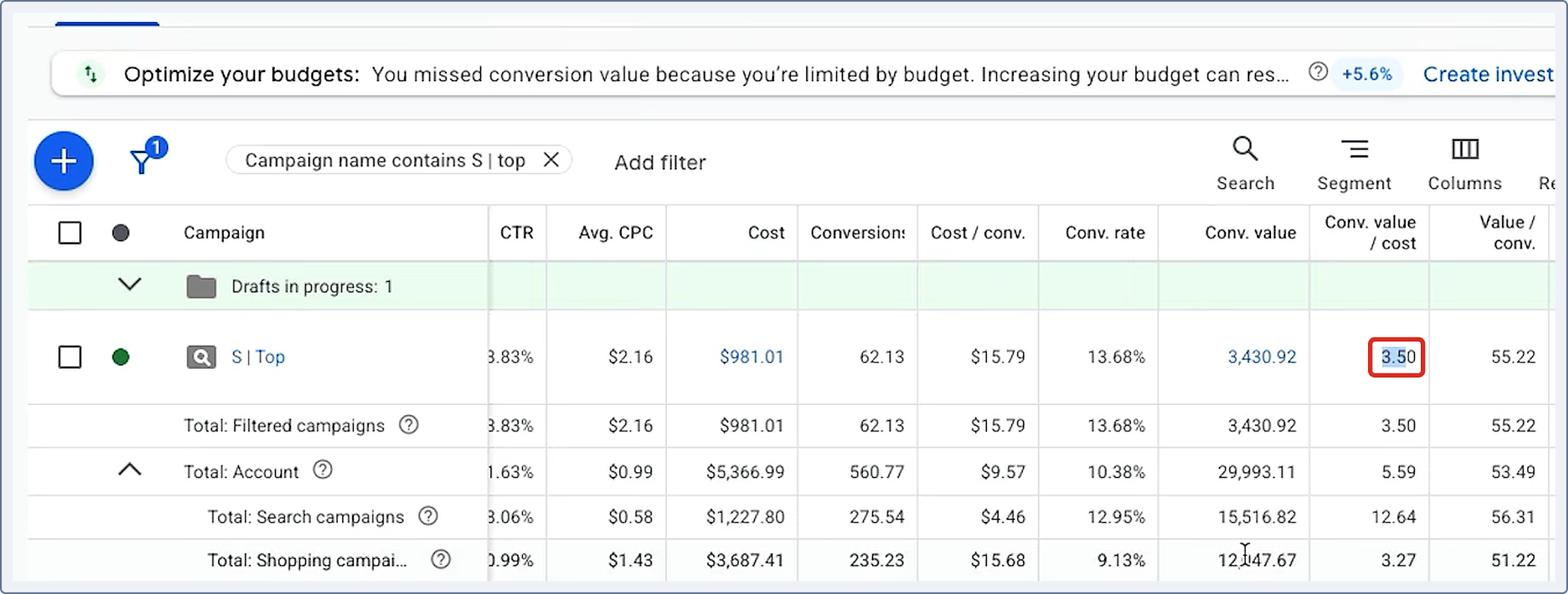
Campaign view from the source video; 3.50 conversion value per cost is selected.
Before August 17, that mismatch was fine. The campaign was budget-limited, so smart bidding was finding the cheapest high-value auctions inside the budget. The 200% target was just a safety net saying, don’t drop below this.
After August 17, that same 200% target is now instructive. If this account does nothing, the ROAS will drift from 350% back down to 200%.
The campaign will still hit its target. Google will say the account is healthy. But the account will enter more expensive auctions it previously would have avoided, each conversion will cost more, and the total conversion volume will drop.
The number on the dashboard looks fine. The business performance is worse.
The Hidden Price Hike in Competitive Markets
Imagine ten plumbers in Miami, all bidding on the same plumbing keyword. All ten have Target CPAs of $50. All ten are budget-limited at $100 per day. All ten are overperforming, getting roughly $30 CPAs.
None of them watch Google Ads update videos.
August 17 arrives. None of them change anything.
All ten CPAs begin creeping up toward $50. Each advertiser gets less conversion volume for the same budget. The algorithm, now bidding for the $50 target, enters auctions it would have skipped before.
Now imagine one of those ten plumbers is paying attention. They log in, see the change, and lower their target to $30 to match their actual performance. Nothing changes for them.
Then one of the other plumbers takes the other path. They look at the performance, decide they were fine paying $50 originally, and raise their budget. Now that plumber is more aggressive in the auctions, winning more of them.
The other nine plumbers feel that, their performance starts to shift, and the market moves. That’s how quiet price inflation starts in a vertical.
Small advertisers who aren’t watching the updates are the ones who get moved first and recover last.
How to Tell If Your Account Is Affected
Pull up every campaign in your account and look for two signals at the same time:
- The campaign has a Target CPA or Target ROAS set.
- The campaign is limited by budget. Google’s status column will usually say so, or you’ll see your daily spend hit the budget consistently.
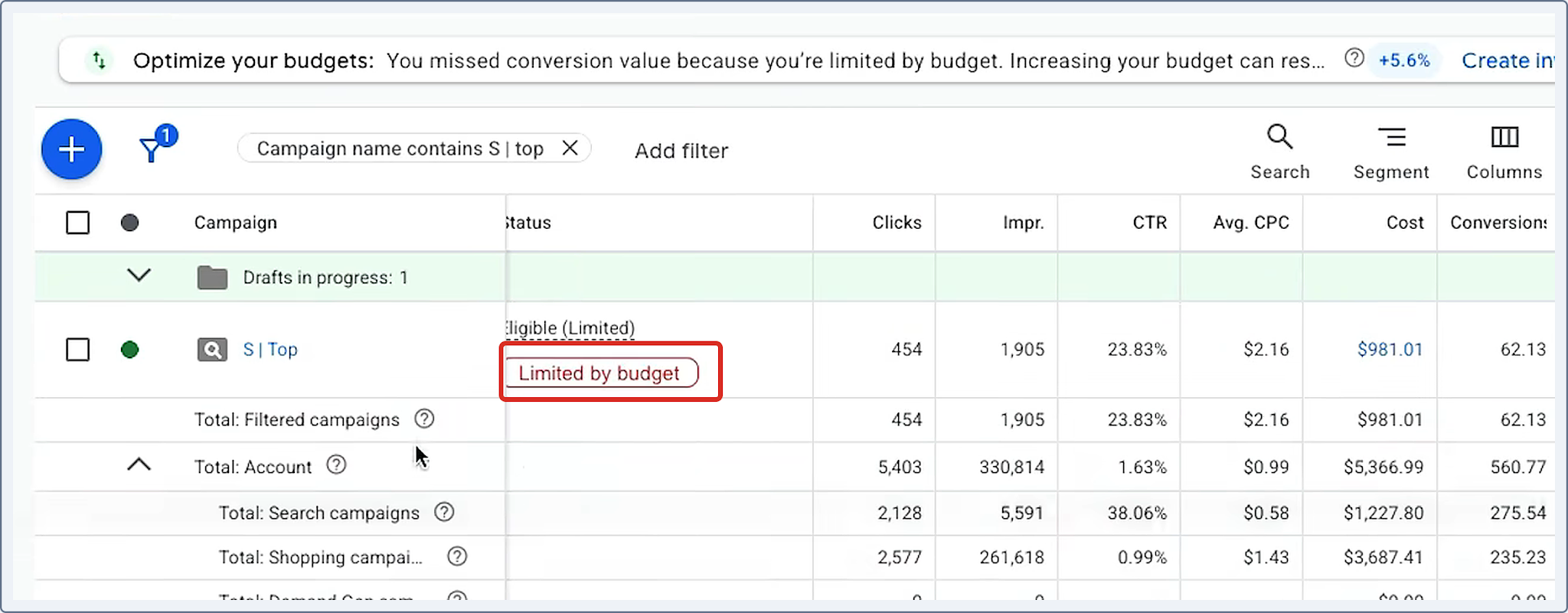
Campaign status from the source video.
If both are true, check your recent performance against the target. If you’re overperforming (lower CPA than target, or higher ROAS than target), this change is affecting you.
If you’re not overperforming, the change isn’t really hurting that account. The algorithm was already working at the target.
What to Do If You’re Overperforming
Two paths, depending on what you actually want from the campaign.
1. If you want to keep the current performance: adjust your target to match the actual performance you’ve been seeing. If your Target ROAS is 200% and you’ve been hitting 350%, stair-step it up. Move from 200% to 250%, give it a week. Then 250% to 300%, give it a week. Then 300% to 350%.
2. If you were happy with the original target and want more volume: increase the budget. The original target is now what Google will bid toward. If you were willing to pay $50 per conversion before and the campaign was capped at $100 per day, raise that cap. You will get more conversions at the $50 target, which is what you asked for in the first place.
Don’t do both at once. Pick one path per campaign and let the data settle before you change anything else.
And don’t do nothing. Doing nothing means less volume for the same spend.
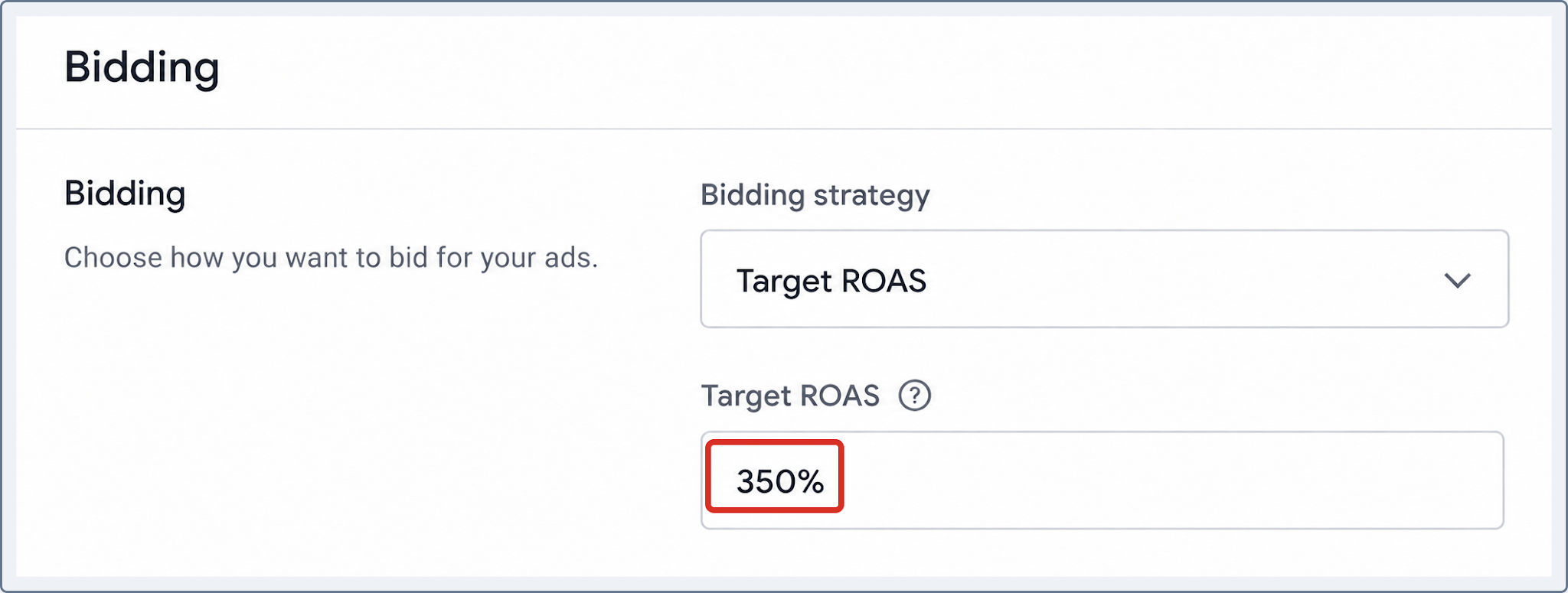
Illustrative Google Ads Target ROAS setting.
The Campaign Types This Doesn’t Affect
Google carved out a few campaign types from this change:
- App campaigns
- Video reach campaigns
- Video view campaigns
Everything else is in. Search, Shopping, Performance Max, Display, Demand Gen, standard video action campaigns. If you’re running any of those with a Target CPA or Target ROAS and the campaign is limited by budget, this change applies.
FAQs: The August 17th Google Ads Change

What exactly changed on August 17 for Google Ads?
Google stopped letting budget-limited campaigns overperform their Target CPA or Target ROAS. Before August 17, a budget-limited campaign with a $10 Target CPA could easily produce a $5 CPA, because the algorithm chased the cheapest conversions inside the daily cap. After August 17, that same campaign now bids for a $10 CPA, because the target is now instructive rather than a ceiling.
Does this affect every Google Ads campaign?
No. The change applies only to campaigns using Target CPA, Target ROAS, Maximize Conversions with a target, or Maximize Conversion Value with a target. App campaigns, video reach campaigns, and video view campaigns were explicitly excluded.
How do I know if my campaign is limited by budget?
Google’s campaign status column will usually flag it with a warning that says the campaign is limited by budget. You can also see it in the recommendations tab, or just look at your daily spend against your daily budget. If the campaign consistently spends the full budget, it’s budget-limited.
Will Google Ads cost more after this change?
For campaigns that were overperforming before and don’t adjust, yes. The algorithm now enters more expensive auctions it previously would have skipped, so the effective cost per conversion goes up and the total conversion volume goes down. For campaigns that were already performing at target, there is no meaningful difference.
Should I lower my Target CPA to match my actual performance?
Only if you want to keep performing where you are. The alternative is to leave the target where it was and raise the budget, which gets you more conversions at the target you originally set. Both are valid choices. The one thing you shouldn’t do is leave both unchanged.
Why did Google do this?
Officially, for stability. Advertisers often raised their budget on an overperforming campaign and then saw performance fluctuate as the algorithm worked across a wider range of auctions. The new behavior gives advertisers predictable performance when they scale. Unofficially, it also unlocks more expensive auctions for Google to serve ads in, which almost certainly increases Google’s revenue.
Final Thoughts
The August 17 change is a reminder that your Google Ads account is only as good as the inputs you give it.
Before August 17, a loose target on a budget-limited campaign was free upside. You could tell Google you wanted $50 and get $30, and nobody questioned it.
After August 17, a loose target is a tax. You’re telling Google you’re willing to pay more than you need to, and Google is now taking you at your word.
The targets you set in 2024 or 2025 were the right call then. The question is whether they’re still the right call now, and the only way to find out is to look.
Get a personalized, 1-on-1 Google Ads account review.
We offer a free account analysis for advertisers who qualify. It’s a custom-tailored, in-depth review of your Google Ads account that reveals day-one improvements to your campaigns.
We work with businesses where we’re confident we can deliver real results, so we’ll need a few details on your business and goals before we book the call.
If that sounds like a fit, click below to apply.
