

 by Austin LeClear
on October 26, 2026
TLDR: Negative keywords in Google Ads work in two phases. Most accounts should keep adding them. But accounts with high conversion volume, stable smart bidding, and broad match (or AI Max) working can benefit from removing them. We removed thousands from one Shopping campaign and kept only 18. A competitor keyword we unblocked produced about $7,000 at almost 4x ROAS.
One of our ecommerce Shopping campaigns now runs on 18 negative keywords and a brand exclusion list. It used to run on thousands.
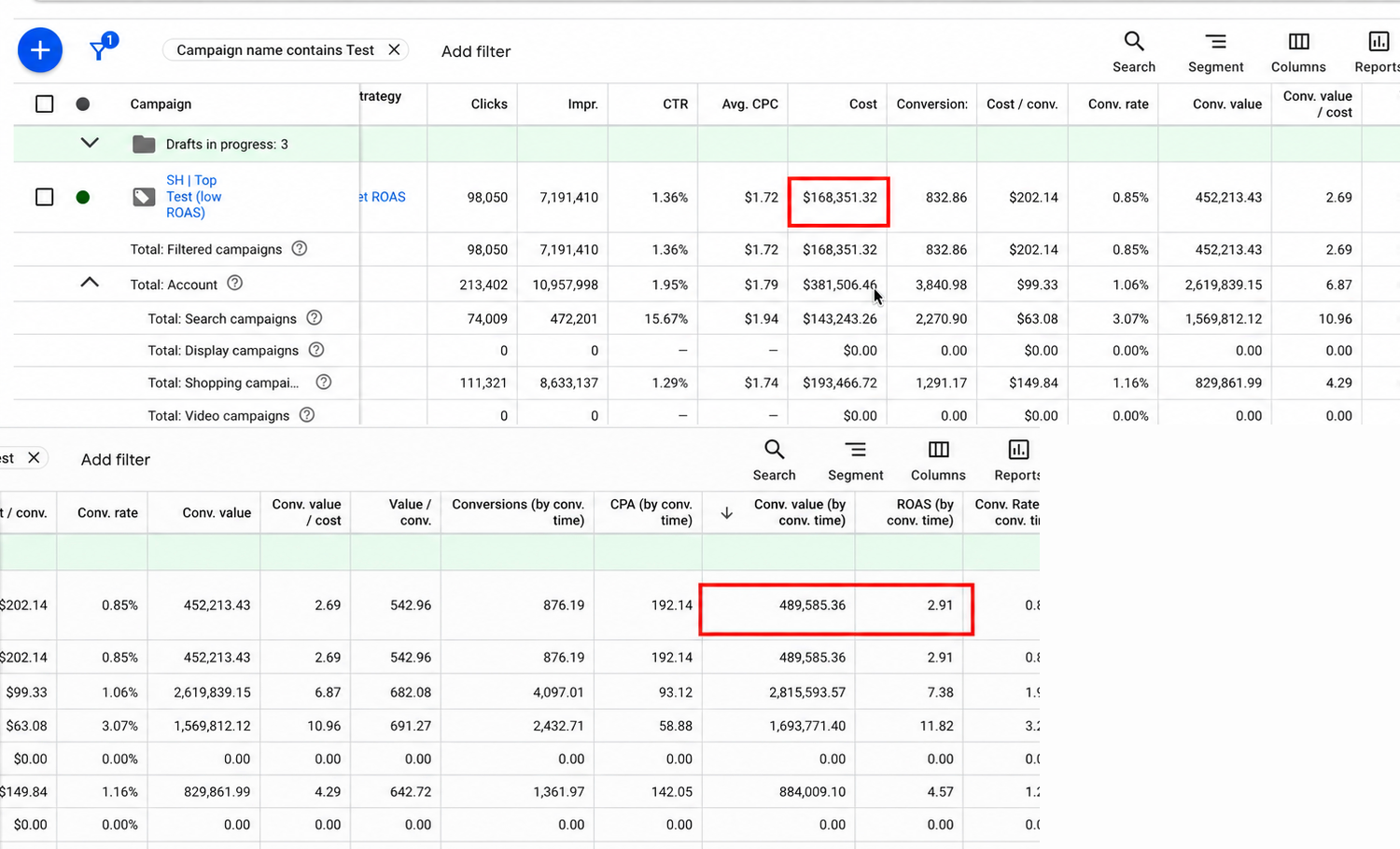
This year, that campaign has produced almost $500,000 in revenue at a 2.91x ROAS.
That sounds backwards. But for some advertisers, adding negative keywords is actually limiting the performance of the account.
However, this approach is not for everyone. Most of you reading this should keep adding negative keywords, and probably more often than you do now.
But a Google Ads account can reach a second phase. In that phase, the negative keyword list you spent years building can start blocking sales. We removed thousands of negatives from that campaign, and Google started making real money on search terms that look like they should have been excluded.
Prefer video? Check out Why I’m Removing Negative Keywords in 2026 on YouTube:
Still with us? Good, let’s dive in.
What a Negative Keyword Actually Does
When you add a negative keyword, you’re telling Google not to show your ad to anyone searching for that term.
In other words, you’re limiting the auctions Google is allowed to enter.
In most accounts, that’s exactly what you want. Google is happy to spend your money on searches that were never going to convert, and a good negative keyword list is how you stop that.
The real question is this: at what point does that limit stop protecting your budget and start costing you sales?
Phase 1: Keep Adding Negative Keywords
You’re in phase one if you’re working with either a brand-new account or an account with low or limited conversion volume.
On a new account, you absolutely should be adding negative keywords. In our trainings, the recommendation is to do it every single day.
Here’s why: Google doesn’t yet have enough data to recognize the people most likely to convert for your business. Even with a sound campaign structure, it does a poor job of putting your ads in front of the right people at the start. Don’t give Google more of your money than it has earned.
The same applies when conversion volume is limited. And limited volume doesn’t always mean low spend. A B2B SaaS company can spend $100,000 a month and still have smart bidding that behaves unpredictably, because there just aren’t many conversions for the algorithm to learn from.
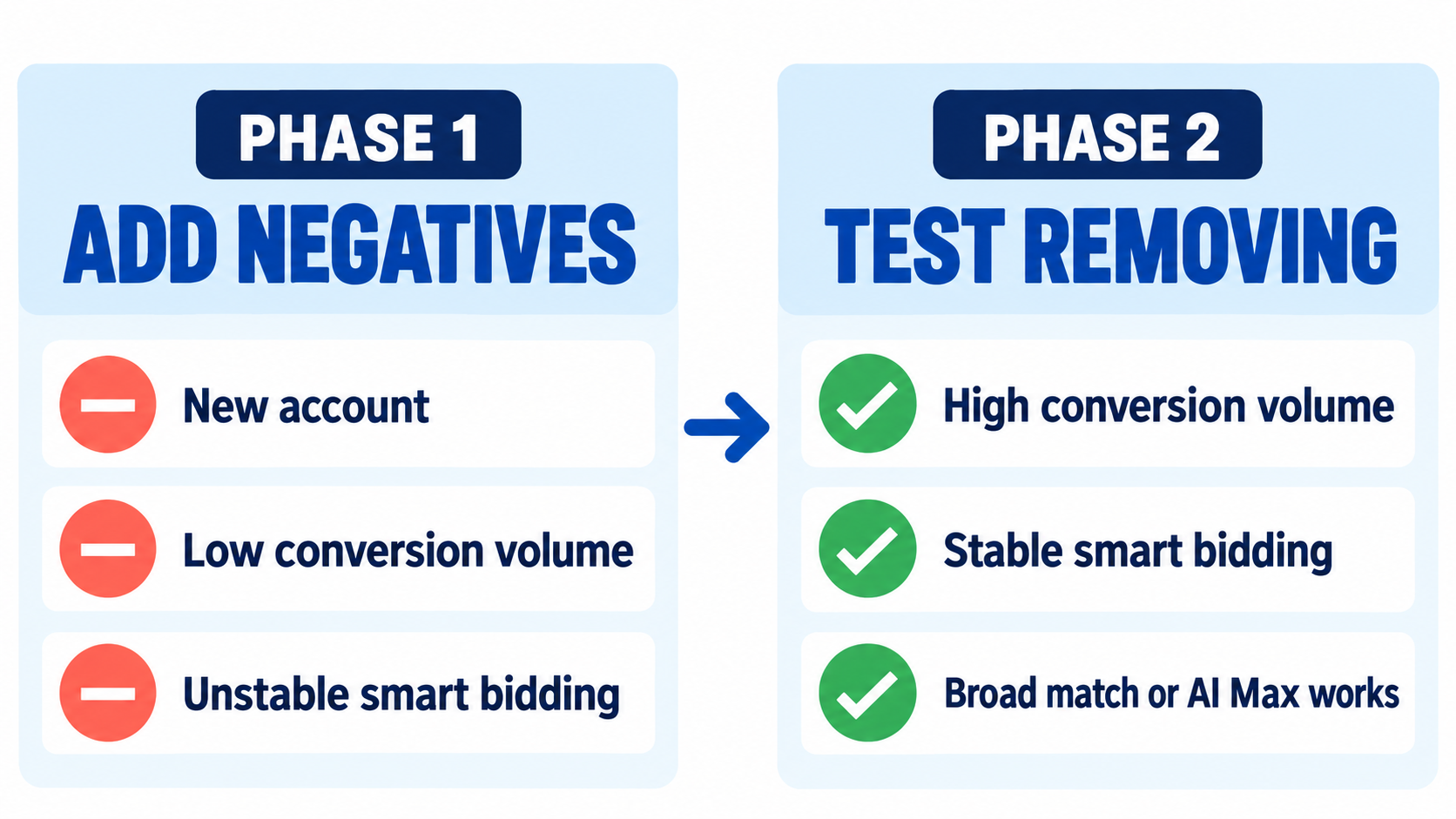
If that sounds like your account, keep building your negative keyword lists. It doesn’t have to be a chore, either. Scripts, Claude skills, and our internal AI campaign builder can handle most of the work.
Read more: How I Automated Negative Keywords in Google Ads (With Claude)
How to Tell If You’re Ready for Phase 2
You’re in phase two when you can honestly say yes to all of these:
- Your smart bidding is consistent. If your campaign is at a 200% Target ROAS and you move it to 220%, performance shifts a little but stays stable. There are no strange swings, slowdowns, or periods where the campaign stops spending.
- You have plenty of conversion volume. You spend a lot, conversions come in steadily, and you’re confident in how the campaigns behave.
- On Search, broad match keywords are working for you. Or you’re using AI Max, and that’s working too.
If you hesitated on any of those, you’re still in phase one. That’s fine, and it’s where most accounts are.
Read more: When to Switch from Maximize Conversions to Target CPA (Most People Get This Wrong)
Why Broad Match Changes What You’re Actually Buying
When broad match or AI Max is working well, you’re not really targeting keywords anymore.
At that point, Google has enough conversion data to recognize likely buyers. It enters auctions and tries to pick out the people who resemble your past buyers.
That’s why some accounts can run almost entirely on broad match and still perform.
You’re not buying the keyword. You’re asking Google to find people who look like your customers.
This is where negative keywords can start to hurt. Every negative you add blocks a set of auctions, and some of those auctions contain exactly the buyers Google was trying to find.
At this stage, Google is evaluating the person behind the search. Not just the search term itself.
Inside the Shopping Campaign: From Thousands of Negatives to 18
Here’s a real account where we did this. It’s an ecommerce Shopping campaign for Home Reserve, a furniture brand.
This year, the campaign has spent about $168,000 and produced almost $500,000 in revenue, a 2.91x ROAS.
We still exclude brand terms from this campaign. The brand has a dedicated branded Shopping campaign for that traffic, so we don’t want this campaign competing for it.
Read more: How to Exclude Brand Terms from Your Performance Max Campaigns
Beyond brand, the campaign has a total of 18 negative keywords.
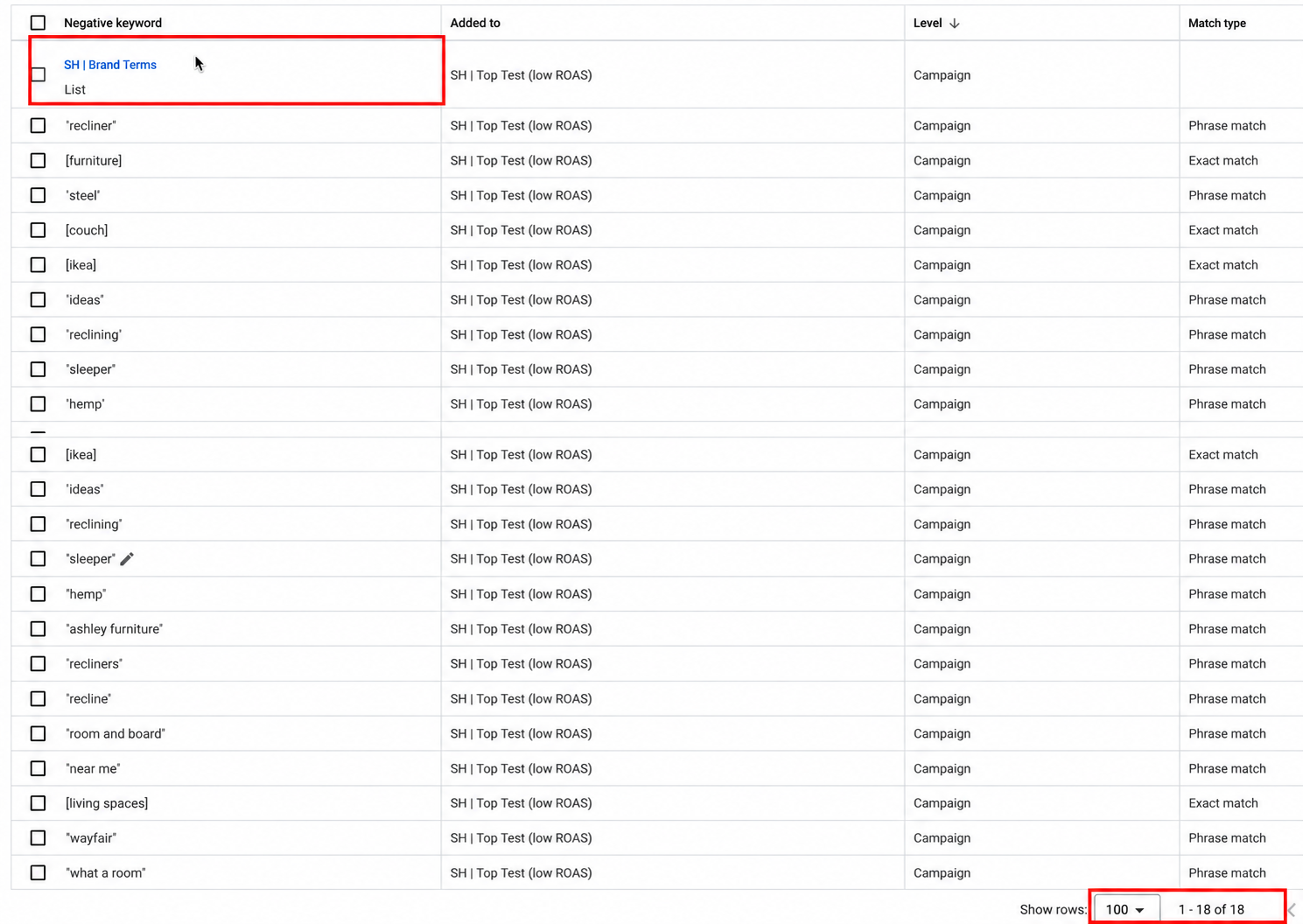
It used to be very different. Two of the shared negative keyword lists that once applied here held about 4,000 keywords each. We were running thousands and thousands of negatives.
[
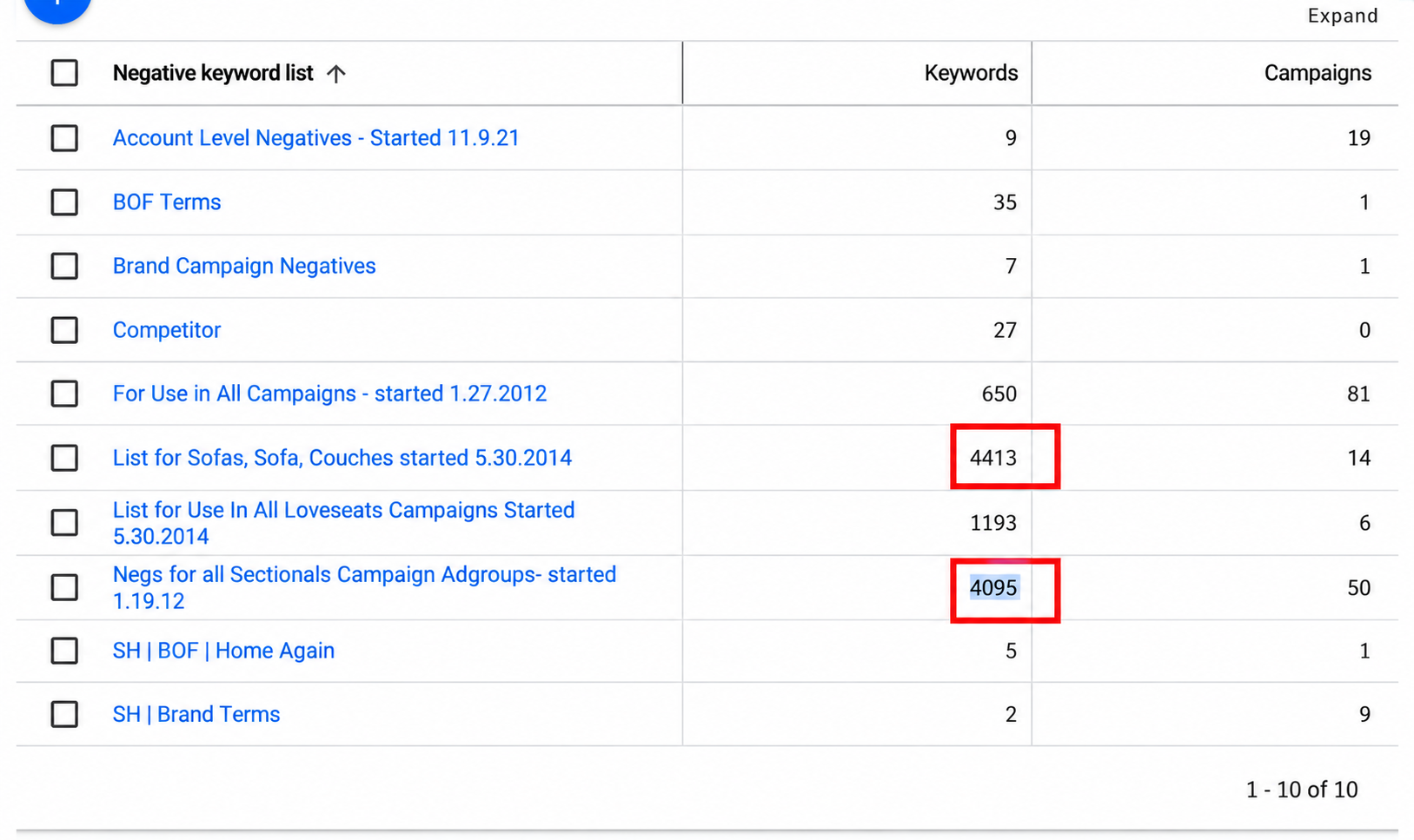
Once this Shopping campaign was dialed in, we removed those lists as a test. We still review wasted spend in the search terms report. A few terms kept underperforming, and Google would have kept spending small amounts on them over time, so those went back in as negatives. That’s where the 18 came from.
Targeting a Competitor Failed. Unblocking It Worked.
The Lovesac competitor term is what made us run the test in the first place.
One of Home Reserve’s competitors is Lovesac. At one point, we targeted the Lovesac name on purpose in a Search campaign, because some data suggested it might work.
That Search campaign returned a 0.26x ROAS. It was a terrible result.
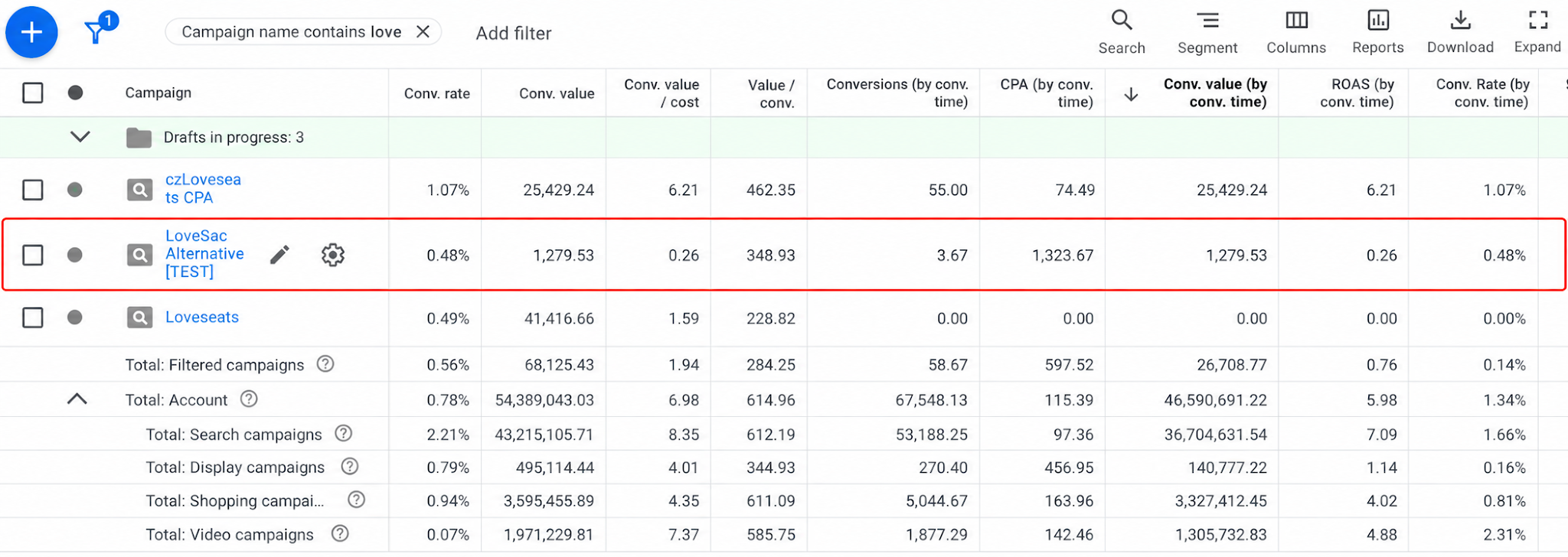
In most cases, that’s what happens with competitor targeting. Unless you build a specific competitor initiative, like a dedicated campaign with a comparison landing page (something a lot of mattress companies do), it usually doesn’t pay off.
So in phase one, add your competitors as negative keywords. Some people argue that if someone is searching for a competitor, they might not have heard of you yet. But this isn’t billboard advertising. We are trying to make money right now, especially in phase one.
Phase two is different. In the Shopping campaign, where Lovesac is no longer a negative keyword, that term has produced about $7,000 in revenue at almost a 4x ROAS. That’s above the target we set for the campaign.
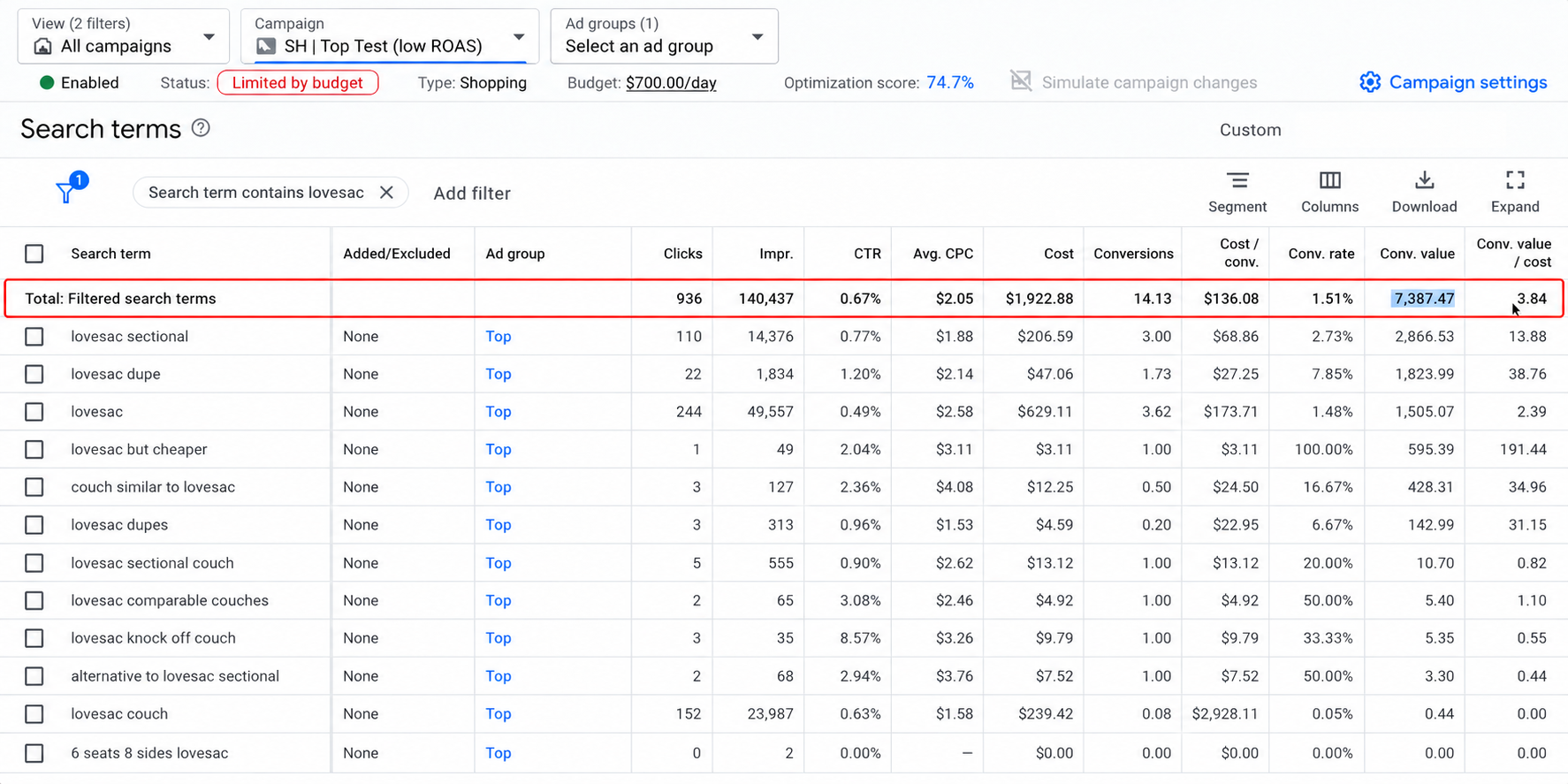
Look at the volume. The term had about 140,000 impressions this year and just over 900 clicks. Google only let us into a small fraction of the people searching for Lovesac, the searchers it decided looked like buyers for Home Reserve.
It’s not a lot of money for an account this size. But it’s $7,000 in profitable revenue we would never have had with that negative in place. Add up a few thousand here and a few thousand there across every negative keyword theme we removed, and it becomes real money by the end of the year.
Why Some Negative Keywords Stay
Removing negatives doesn’t mean removing all of them.
“Recliner” is still a negative keyword in this account. When we removed it during the test, Google kept showing our ads on recliner searches, and over longer time frames, those clicks simply didn’t convert.
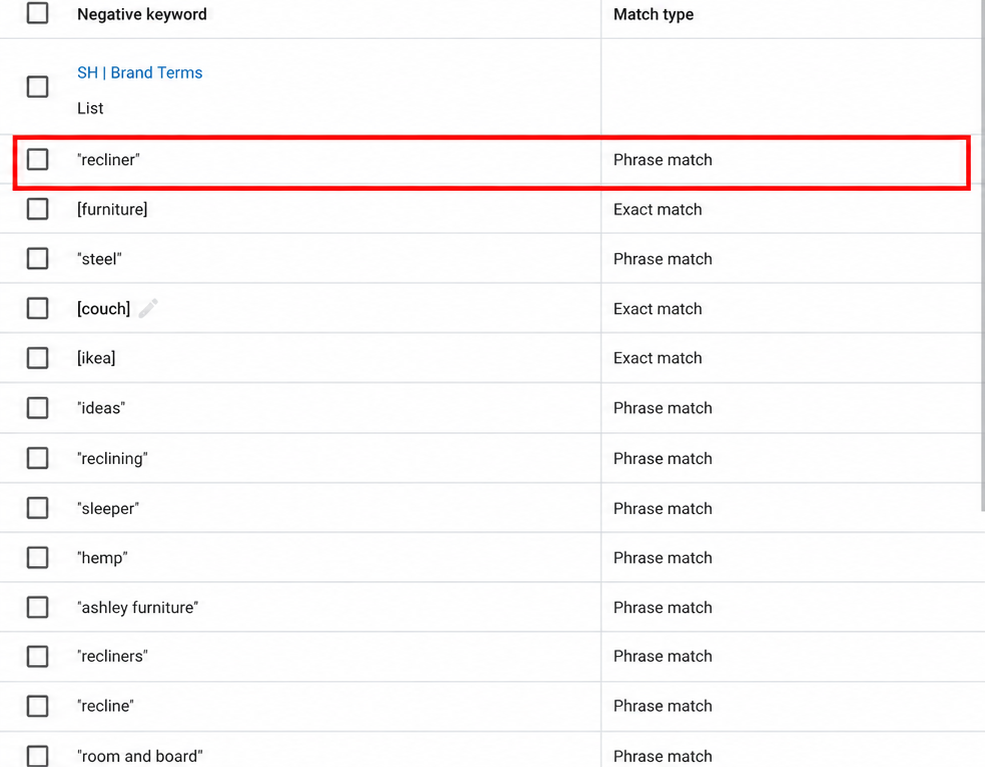
The reason is simple: Home Reserve doesn’t sell any reclining furniture. Google can decide that a searcher looks likely to buy, but nobody searching for a recliner sofa is going to buy one from a store that has zero recliner sofas.
So keep the obvious negatives: products you don’t sell, services you don’t offer, and searches that can’t turn into a sale on your site. Test removing the rest.
Running the Same Test on Search
We ran the same test on a Search campaign in the same account. It’s mostly driven by broad match keywords with some exact match keywords added in. It has plenty of volume, so it’s in phase two as well.
We removed negative keywords from it, and it held up just fine.
Here’s the Lovesac term again. In Search, it has produced about $7,000 in revenue at a 1.65x ROAS.
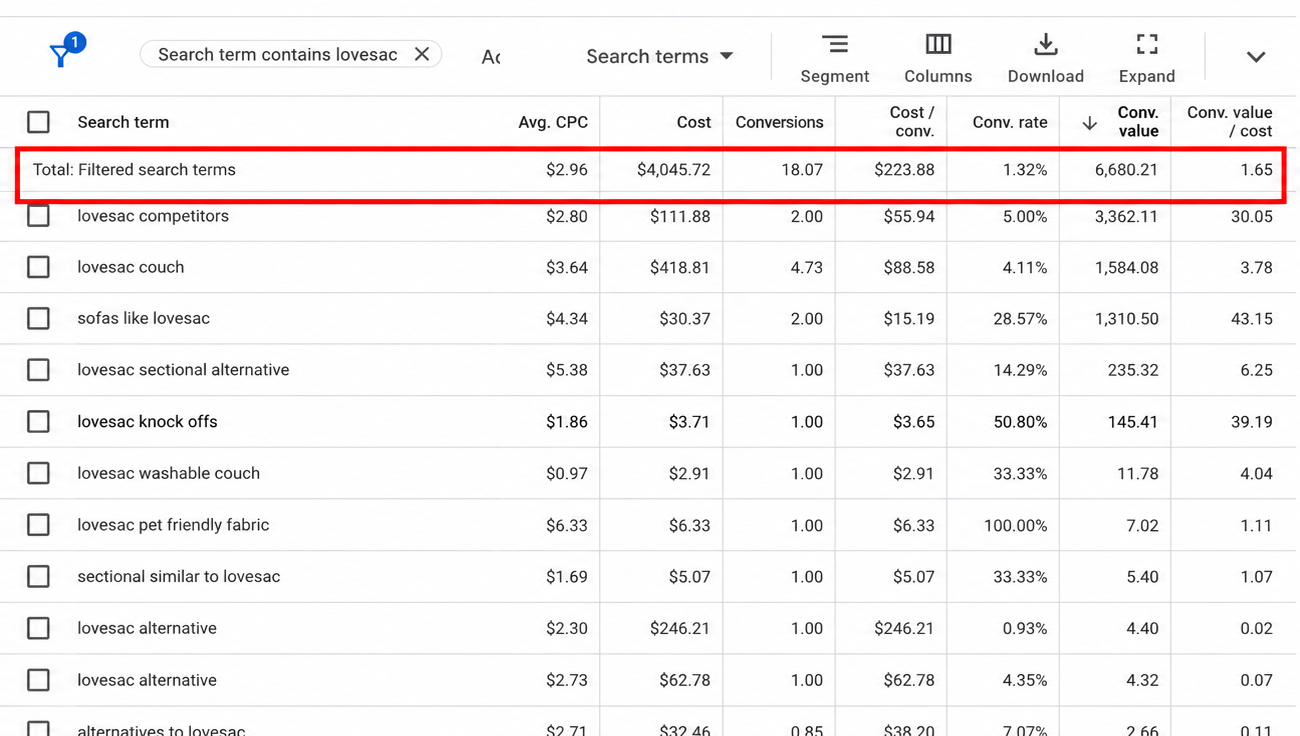
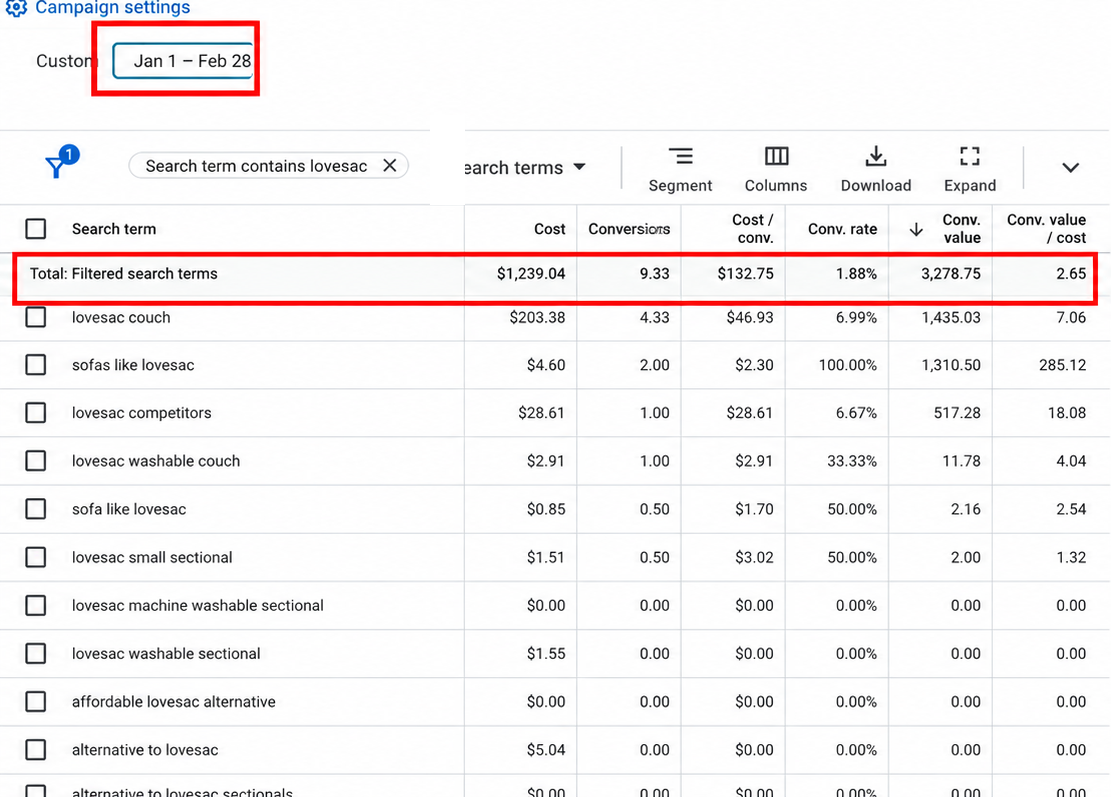
That number undersells it. This account has a longer sales cycle, so we judge performance using conversions by conversion time instead of the standard conversion columns. Google only offers those by-time metrics at the keyword, ad group, and campaign level, not for individual search terms.
When we look back at January and February, where the conversion data has had time to fully fill in, the same term shows a 2.65x ROAS. That meets the performance goals for this account, so it stays.
Read more: How to Use Google’s “By Conversion Time” Reporting
How to Start Removing Negative Keywords Safely
If you’re confident you’re in phase two, here’s how to test it without putting the account at risk:
1. Start with competitor negatives. Remove only those, then watch performance for long enough to judge it.
2. If that works, remove more negatives in batches. Take out one theme or one list at a time so you can see what each change does.
3. Keep reviewing your search terms. If something keeps losing money over a longer time frame, add it back as a negative.
4. Keep the obvious exclusions. Brand terms that belong in their own campaign, products you don’t sell, and anything that can’t possibly convert.
You don’t need to clear out every negative the way we did. That depends on your risk tolerance. Small batches will tell you most of what you need to know.
And if you’re not in phase two (you’re not running much broad match, or conversion volume is still limited), keep doing what you’re doing. Keep adding negative keywords.

FAQs: Removing Negative Keywords
Should I remove negative keywords from my Google Ads account?
Only if your account is in phase two. That means high conversion volume, smart bidding that stays consistent when you change targets, and broad match keywords or AI Max that are already working. New accounts and accounts with limited conversion volume should keep adding negatives.
How do I know if I have enough conversion volume to remove negative keywords?
Change your bid target slightly, for example from a 200% to a 220% Target ROAS, and watch what happens. If performance stays stable without strange swings or periods where spend stalls, you likely have enough volume. If small target changes cause big disruptions, you don’t have enough conversion volume yet.
Should competitor names be negative keywords in Google Ads?
In phase one, yes. Competitor traffic rarely converts unless you build a dedicated competitor campaign with its own landing page. In phase two, competitor negatives are the first batch worth testing, because Google can pick out the small share of competitor searchers who actually look like your buyers.
Why would Google make sales on search terms that look irrelevant?
In a high-volume account, Google isn’t really matching on the keyword. It’s matching on the person. It enters a small slice of those auctions, only for searchers who resemble your past buyers, so a term that looks bad on paper can still produce profitable sales.
Should I keep brand terms as negatives in my Shopping or Performance Max campaigns?
If you run a separate brand campaign, yes. In the account in this article, brand terms are still excluded from the main Shopping campaign because a dedicated branded Shopping campaign handles that traffic.
How often should I add negative keywords to a new Google Ads account?
On a brand-new account, review your search terms and add negatives daily. Google doesn’t yet have enough data to recognize people likely to convert for you, so frequent negatives protect your budget while it learns. Scripts and AI tools can automate most of this.
Final Thoughts

Negative keywords aren’t good or bad. They’re a limit on which auctions Google can enter.
Early on, that limit protects your budget while Google learns what a buyer looks like. Once the account has the volume and the broad match performance to prove Google has learned it, the same limit can block auctions where your buyers are actually searching.
The negatives you added three years ago were the right call then. The question is whether they’re still the right call now, and the only way to find out is to test them in small batches.
Get a personalized, 1-on-1 Google Ads account review.
We offer a free account analysis for advertisers who qualify. It’s a custom-tailored, in-depth review of your Google Ads account that reveals day-one improvements to your campaigns, the same kind of audit behind everything in this article.
We don’t take every account that applies. We work with businesses where we’re confident we can deliver real results, so we’ll need a few details on your business and goals before we book the call.
If that sounds like a fit, click below to apply.
